26th Oct 2012 Das Keyboard
While running Linux my trusty Apple Extended Keyboard hasn’t been getting much use. Instead of taking the time to perform the obvious task or remapping my Apple keyboard, I decided to indulge my curiosity and purchase the Das Model S Ultimate Keyboard instead. I first heard about the Das Keyboard from Shawn Blanc, when he reviewed three different clicky keyboards for use on the Mac.
The Das Keyboard has two great things going for it. More than the other two keyboards, I prefer the tactile feel of the blue Cherry MX switches and the audio click of the Das. Since you don’t buy a mechanical keyboard for its aesthetics, for those looking to get a clicky keyboard, this is the one I would recommend.
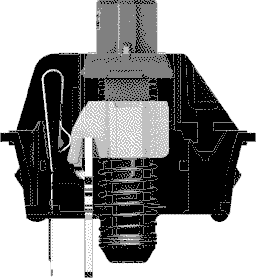
I have tried a Tactile Pro in the past, and am a big fan of Apple’s Extended Keyboards from the last century, but I had never heard of the Das before Shawn recorded its clickiness for the all the web to hear. The Das Keyboard Model S Ultimate is the loudest keyboard I have ever used. It employs 104 German made gold plated Cherry MX Blue mechanical key switches to produce its signature clicky sound, and distinctive two stage feel. > The Blue switches are popular within the typing community because of the “clicky” tactile bump when the activation point is hit. The overall experience of Blue switches is very similar to typewriters, however, those around you might not be as big of a fan due to the audio feedback. The standard “clicky” versions of Das Keyboards utilize Blue switches.
Sharper than the click-clock sound of my Alps equipped Apple Extended Keyboard I, the Das Keyboard’s clicky key switches really come into their own when typing at high speeds. The Das is the Death Star or keyboards. Large, black, and glossy, The Das Model S Ultimate is the keyboard Darth Vader if he couldn’t get dictation in his meditation chamber. At almost three pounds, the Das Keyboard is almost as heavy as my Apple Extended Keyboard. Lacking the large “function key forehead” of Apple’s Extended, the Das features a more streamlined design that still dominates my desktop. Its extra long two meter USB cord means Ican layout your workspace any way I like, and its high-speed USB 2.0 hub allows me to sync and charge up to two devices including an iPad from the keyboard’s right side. I only wish the USB cable was was easier to conceal, and that there was a USB port on opposite side of the keyboard for South Poles like me. In order to get the maximum charge out of the Das you need to plug in both USB plugs that fork from the end of the Das’ extra long cable. Its massive size, and cabling requirements might make the Das a little too much for Ultrabook users who only have a single USB port on either side of their laptops. While some might call the Das keyboard “ugly,” I think the Das Model S Ultimate looks rather BAD ASS.
Just because it has mechanical switches, which were especially common from keyboards of the ‘80s and ‘90s, doesn’t mean it should also look like it’s been rescued from 20 years ago.
One of the things that makes the Das Model S Ultimate keyboard so BAD ASS is the fact it has no key cap inscriptions at all. Instead of the “horrendous” typeface Das uses on its other keyboards, the Ultimate models are free of markings, striking fear and awe into the hearts of everyone that passes by. Learning to type on an unmarked Das keyboard means learning to type stronger. I can no longer cheat by looking down at the keyboard to find those rarely used, out of the way characters. Before using the Das I found myself still looking down at my keyboard from time to time to regain confidence and make sure my finger reached the proper key. With the Das I am building the muscle memory all great typists have. For the first time since my high school typing class I make my fingers do the walking without looking down. I will admit I had to rethink some of my harder to type passwords after adopting the Das, but after two weeks of constant use I am surprised at how well I remember the QWERTY keyboard layout without cheating. The Das Model S Ultimate Keyboard fits its name. It is the ultimate typing tool for anyone who wants to develop muscle memory, build confidence, increase speed, and scare away onlookers with a inscription less keyboard and a BAS ASS clicky sound. I hate to retire my Apple Extended Keyboard, but ADB has been gone for over 16 years. It is time to make the switch.